10. Hands-On Session 10: Master the fundamentals of absolute binding free energy calculations
10.1. Learning Objectives
Determine Boresch-style restraints from an equilibrated end-state trajectory, selecting stable ligand-protein anchor atoms.
Generate the six restraint coordinates (one distance, two angles, three dihedrals) and write an Amber NMR-format
rest.infile.Analyze histogram and time-series plots to assess how well the anchors hold the ligand’s position and orientation.
Compute the analytical free-energy contribution of the Boresch restraints.
Apply the correct Amber force-constant convention (
K(x-x0)^2, with no 0.5 factor) when evaluating the restraint free energy.Validate the calculation by reproducing the literature value for the Tyk2
rest.inparameters.
Set up a lambda schedule and generate per-window annihilation input files for the binder and complex legs.
Scale the Boresch restraints through a
lambda.schfile so the restraints turn on toward the decoupled state.Equilibrate the lambda windows and run production with Hamiltonian replica exchange for both the binder and complex environments.
10.2. Activities
        flowchart LR

%% ===== inputs =====
I1["Input files<br/>target_ejm_31_hmr.parm7<br/>complex_ejm_31_unrestrained.nc"]

%% ===== boresch restraints =====
P1{{"<b>[§10.2.2]</b><br/>Determine Boresch restraints from trajectory<br/>generate_boresch_restraints.py"}}
O1["<b>[from §10.2.2]</b><br/>Restraint definition<br/>rest.in"]
I1 --> P1
P1 --> O1

%% ===== restraint free energy =====
P2{{"<b>[§10.2.3]</b><br/>Compute analytic restraint contribution<br/>python script"}}
O2["<b>[from §10.2.3]</b><br/>Restraint free energy<br/>dA_rest"]

O1 --> P2
P2 --> O2

%% ===== annihilation setup (complex) =====
I2["Input files<br/>target_ejm_31_hmr.parm7<br/>complex_ejm_31_unrestrained.rst7"]
P3{{"<b>[§10.2.4.2]</b><br/>Set up annihilation with lambda schedule<br/>sed / pmemd.cuda"}}
O3["<b>[from §10.2.4.2]</b><br/>Per-lambda minimized states<br/>annihilate_complex_N.rst7,annihilate_complex_N.nc, annihilate_complex_N.mdout"]
O1 --> P3
I2 --> P3
P3 --> O3

I3["Input files<br/>binder_ejm_31_hmr.parm7<br/>binder_ejm_31_unrestrained.rst7"]
P4{{"<b>[§10.2.4.2]</b><br/>Set up annihilation with lambda schedule<br/>sed / pmemd.cuda"}}
O4["<b>[from §10.2.4.2]</b><br/>Per-lambda minimized states<br/>annihilate_binder_N.rst7,annihilate_binder_N.nc, annihilate_binder_N.mdout"]
I3 --> P4
P4 --> O4

%% ===== equilibration complex =====
P5{{"<b>[§10.2.5.2]</b><br/>Equilibrate windows then run production<br/>pmemd.cuda.MPI"}}
O5["<b>[from §10.2.5.2]</b><br/>Equilibrated system<br/>complex_equil1_$N.rst7<br/>complex_equil1_N.nc<br/>complex_equil1_N.mdout"]
O3 --> P5
P5 --> O5

%% ===== equilibration Binder =====
P6{{"<b>[§10.2.5.1]</b><br/>Equilibrate windows then run production<br/>pmemd.cuda.MPI"}}
O6["<b>[from §10.2.5.1]</b><br/>Equilibrated system<br/>binder_equil1_$N.rst7<br/>binder_equil1_N.nc<br/>binder_equil1_N.mdout"]
O4 --> P6
P6 --> O6

%% ===== Production complex =====
P7{{"<b>[§10.2.5.5]</b><br/>production run<br/>pmemd.cuda.MPI"}}
O7["<b>[from §10.2.5.5]</b><br/>Production run outputs<br/>complex_trial_production_$N.rst7<br/>complex_trial_production_N.nc<br/>complex_trial_production_N.mdout <br/>remd_complex_ejm31.log"]
O5 --> P7
P7 --> O7

%% ===== Production Binder =====
P8{{"<b>[§10.2.5.4]</b><br/>production run<br/>pmemd.cuda.MPI"}}
O8["<b>[from §10.2.5.4]</b><br/>Production run outputs<br/>binder_trial_production_N.rst7<br/>binder_trial_production_N.nc<br/>binder_trial_production.mdout<br/>remd_binder_ejm31.log"]
O6 --> P8
P8 --> O8

classDef file fill:#fff7e6,stroke:#d98c00,stroke-width:1.5px,color:#111;
classDef program fill:#e8f1ff,stroke:#1f77b4,stroke-width:1.8px,color:#111;
classDef result fill:#eaf7ea,stroke:#2ca02c,stroke-width:1.5px,color:#111;
class I1 file;
class I2 file;
class I3 file;
class P1 program;
class P2 program;
class P3 program;
class P4 program;
class P5 program;
class P6 program;
class P7 program;
class P8 program;
class O1 result;
class O2 result;
class O3 result;
class O4 result;
class O5 result;
class O6 result;
class O7 result;
class O8 result;
10.2.1. Accessing the Tutorial Files
To get the tutorial data during the workshop, you can get a copy into your scratch with this command.
DataDir="/data/amber26/TutorialData/HandsOn10_ABFE"
TutorialDir="/scratch/$USER/TutorialData/HandsOn10_ABFE"
mkdir -p $TutorialDir
cp -r $DataDir/* $TutorialDir
cd $TutorialDir
cp -r input working_dir
cd working_dir
For the first two tutorials, you will be using the boresch subdirectory.
mamba activate ambertools
10.2.2. Determining Boresch-style Restraints
In this activity, you will learn how to determine Boresch restraints for use in ABFE calculations. Boresch[1] These restraints are an essential ingredient for ABFE calculations, as they allow us to keep the ligand in place relative to the binding site while decoupling its interactions with the environment.
For this activity, we will be starting from the equilibrated end-state trajectory of a Tyk2-ligand complex in its bound state. These files were generated in the optional activity Equilibrating Endstates in ABFE Calculations (Tyk2); however, for convenience we have provided the necessary files below to get you started. You can download the files using the link below:
Attention
Theory of Boresch Restraints
Boresch restraints are a type of positional restraint used in molecular dynamics simulations to maintain the relative position and orientation of a ligand within a binding site. They are particularly useful in absolute binding free energy calculations, where it is essential to keep the ligand in place while decoupling its interactions with the environment.
The Boresch restraint method involves defining a set of six restraints based on three atoms from the ligand and three atoms from the protein. These restraints include:
One distance Restraint
Two Angle Restraints
Three Dihedral Restraints
These restraints work together to fix the ligand’s position and orientation relative to the protein, allowing for accurate free energy calculations.
Note
This theory section should be expanded with a more detailed explanation of the mathematical formulation of Boresch restraints, including equations and diagrams to illustrate the concepts.
Note
Much of the below theoretical discussion comes from Boresch et al., J. Phys. Chem. B, 2003, 107 (35), pp 9535–9551. DOI: 10.1021/jp0217839.
The goal of Boresch restraints is to define a known set of lambda-dependent restraints that can be applied to the ligand in the bound state to keep it in place while decoupling its interactions with the environment, while also allowing for an analytical correction to the free energy to account for the restraints.
Roughly, the situation that needs to be corrected for is:
Where here, (P cdot L)_{H_2O} is the protein-ligand complex in water with restraints applied, (P)_{H_2O} is the protein in water, and (L)_{H_2O} is the ligand in water. \(\Delta A_r\) is the free energy change associated with removing the restraints from the complex in water.
Because the ligand is in the dummy state when decoupled, the ligand does not have interactions with the protein or solvent and thus the restraints are the only interactions with external sources it feels. The potential energy function for the system is:
Here, there are terms coming from the protein (\(U_P\)), the ligand (\(U_L\)), and the restraints (\(U_r\)).
The contribution to the free energy that comes from the restraints can be written as:
Where \(Z_{P \cdot L}\) is the partition function of the restrained complex, \(Z_P\) is the partition function of the protein, and \(Z_L\) is the partition function of the ligand.
This calculation is feasible analytically when the restraints are chosen such that
or in other words, choosing the restraints such that the partition function can be factored into independent contributions from the protein, ligand, and restraints.
After a few assumptions (Rigid Rotor) the final expression for the partition function is given by:
Finally, the free energy contribution from the restraints can be expressed as:
Where \(r_{aA,0}\) and \(\theta_{A,0}\) are the equilibrium distance and angle values for the restraints, and \(K_r\), \(K_{\theta^A}\), \(K_{\theta^B}\), \(K_{\phi^A}\), \(K_{\phi^B}\), and \(K_{\phi^C}\) are the force constants for the respective restraints.
10.2.2.1. How to Determine Boresch Restraints
To determine the Boresch restraints for your system, you will need to analyze an equilibrated trajectory for the protein-ligand complex.
Note
If you have been following along with the Tyk2 ABFE activities, it is very likely that you have already generated a trajectory. It is also very likely that your trajectory will be different from the one included here, but the steps to generate the Boresch restraints will be the same. Don’t be surprised if your final results differ from those presented here!
For this activity, we will be using the following python code, which you should save as generate_boresch_restraints.py:
#!/usr/bin/env python3
"""Generate Boresch restraints from equilibration trajectory.

This script scans ligand heavy atoms and nearby protein heavy atoms to
identify stable anchor pairs, computes Boresch degrees of freedom over
the trajectory, and prints/writes restraint parameters.

Behavior is preserved from the original script but reorganized for
readability and reuse.
"""

import argparse
import logging
from pathlib import Path

import MDAnalysis as mda
from MDAnalysis.analysis.distances import dist
from MDAnalysis.lib.distances import calc_angles, calc_bonds, calc_dihedrals
import numpy as np
import matplotlib.pyplot as plt


LOG = logging.getLogger(__name__)


def parse_args():
    """Parse command-line arguments.

    Returns
    -------
    argparse.Namespace
        Object with attributes:
        - topology: str, path to topology file (default './unisc.parm7')
        - trajectory: str, path to trajectory file (default 'equil1/real_eq.nc')
        - ligand_sel: str, MDAnalysis selection string for ligand heavy atoms
        - cutoff: float, distance in angstroms to search for nearby protein atoms
        - num_pairs: int, number of lowest-standard-deviation pairs to show/select
        - max_pairs_traj: int, maximum number of pairs to analyze over the trajectory
        - nsteps: int | None, maximum number of trajectory frames to use
        - out_rest: str, output filename to write AMBER restraint input
        - fig_prefix: str, prefix for any figures written

    Notes
    -----
    This function only constructs and returns the parsed arguments object.
    Documentation in tutorials should show running the script like:

    $ python generate_boresch_restraints.py --topology my.parm7 --trajectory my.nc
    """
    p = argparse.ArgumentParser(
        description="Generate Boresch restraints from equilibration trajectory"
    )
    p.add_argument("--topology", type=str, default="./unisc.parm7", help="Topology file")
    p.add_argument("--trajectory", type=str, default="equil1/real_eq.nc", help="Equilibration trajectory file")
    p.add_argument("--ligand-sel", type=str, default="resid 1 and not name H*", help="Selection for ligand heavy atoms")
    p.add_argument("--cutoff", type=float, default=10.0, help="Cutoff (angstrom) to search nearby protein atoms")
    p.add_argument("--num-pairs", type=int, default=5, help="Number of low-SD pairs to show/select")
    p.add_argument("--max-pairs-traj", type=int, default=200, help="Max pairs to analyze over trajectory")
    p.add_argument("--nsteps", type=int, default=None, help="Maximum number of trajectory frames to use for anchor ranking and restraint fitting")
    p.add_argument("--out-rest", type=str, default="rest.in", help="Output restraint file")
    p.add_argument("--fig-prefix", type=str, default="boresch", help="Prefix for saved figures")
    args = p.parse_args()
    if args.nsteps is not None and args.nsteps <= 0:
        p.error("--nsteps must be a positive integer")
    return args


def get_frame_count(u, nsteps=None):
    """Return the number of trajectory frames that will be analyzed."""
    total_frames = len(u.trajectory)
    if nsteps is None:
        return total_frames
    return min(nsteps, total_frames)


def iter_frames(u, nsteps=None):
    """Iterate over the trajectory, optionally truncated to the first nsteps."""
    n_frames = get_frame_count(u, nsteps=nsteps)
    return u.trajectory[:n_frames]


def find_anchor_pairs(u, ligand_sel="resid 1 and not name H*", cutoff=10.0):
    """Find candidate ligand-protein anchor atom pairs.

    Parameters
    ----------
    u : MDAnalysis.Universe
        Loaded universe containing topology and trajectory.
    ligand_sel : str
        MDAnalysis selection string identifying ligand heavy atoms (no H).
    cutoff : float
        Distance cutoff (in Å) used to find protein heavy atoms near each
        ligand heavy atom.

    Returns
    -------
    dict
        Mapping (ligand_atom_index, protein_atom_index) -> dict with key
        'dists' initialized to an empty list. Distances over the trajectory
        will be appended to this list by :func:`collect_distances`.

    Behavior details
    ----------------
    - Protein atoms are selected with the MDAnalysis "around" syntax.
    - The returned atom indices are MDAnalysis global atom indices (0-based).
    """
    lig_heavy = u.select_atoms(ligand_sel)
    anchors = {}
    for lig_atom in lig_heavy:
        # select protein heavy atoms within cutoff of ligand atom
        prot_sel = f"(protein or resname PRT) and (around {cutoff} index {lig_atom.index}) and (not name H*)"
        prot_atoms = u.select_atoms(prot_sel)
        for prot_atom in prot_atoms:
            anchors[(lig_atom.index, prot_atom.index)] = {"dists": []}
    return anchors


def collect_distances(u, anchors, nsteps=None):
    """Populate `anchors` with distance time series from the trajectory.

    Parameters
    ----------
    u : MDAnalysis.Universe
        Universe that has already been loaded with topology and trajectory.
    anchors : dict
        Dictionary produced by :func:`find_anchor_pairs`. Keys are (lig_idx, prot_idx).

    Returns
    -------
    dict
        The same anchors dict with 'dists' converted to numpy arrays and
        augmented with 'avg_dist' and 'sd_dist' for each pair.

    Notes
    -----
    - Distances are computed frame-by-frame using MDAnalysis distance routines
      with periodic box handling (box=frame.dimensions).
    - For performance, this function iterates over frames and pairs; for large
      trajectories or many pairs consider vectorized approaches or sampling.
    """
    n_frames = get_frame_count(u, nsteps=nsteps)

    # Iterate trajectory and collect distances for each pair
    for frame in iter_frames(u, nsteps=nsteps):
        for lig_idx, prot_idx in anchors.keys():
            # compute distance using MDAnalysis distance routine
            distance = dist(
                mda.AtomGroup([u.atoms[lig_idx]]),
                mda.AtomGroup([u.atoms[prot_idx]]),
                box=frame.dimensions,
            )[2][0]
            anchors[(lig_idx, prot_idx)]["dists"].append(distance)

    LOG.info("Collected anchor distances over %d frame(s)", n_frames)

    # convert lists to numpy arrays and compute stats
    for pair in anchors.keys():
        anchors[pair]["dists"] = np.array(anchors[pair]["dists"])
        anchors[pair]["avg_dist"] = anchors[pair]["dists"].mean()
        anchors[pair]["sd_dist"] = anchors[pair]["dists"].std()

    return anchors


def report_low_sd_pairs(u, anchors, n=5):
    """Report and return the top-N anchor pairs with lowest distance SD.

    Parameters
    ----------
    u : MDAnalysis.Universe
        Universe used only for pretty-printing atom information.
    anchors : dict
        Anchors dict returned by :func:`collect_distances`.
    n : int
        Number of pairs to report.

    Returns
    -------
    list
        Ordered list of (lig_idx, prot_idx) tuples sorted by ascending SD.

    This function logs informative lines that can be included in a tutorial
    to show how candidate anchor pairs are selected based on stability.
    """
    ordered = [item[0] for item in sorted(anchors.items(), key=lambda it: it[1]["sd_dist"]) ]
    LOG.info("Top %d pairs by lowest SD:", n)
    for i, pair in enumerate(ordered[:n]):
        a, b = pair
        LOG.info("Pair %d: %s - avg %.2f SD %.2f", i + 1, (u.atoms[a], u.atoms[b]), anchors[pair]["avg_dist"], anchors[pair]["sd_dist"])
    return ordered


def get_anchor_ats(a1_idx, u):
    """Select three anchor atoms around a given atom index.

    Parameters
    ----------
    a1_idx : int
        Index of the primary anchor atom (0-based, MDAnalysis indexing).
    u : MDAnalysis.Universe
        Universe containing topology information - used to query bonded atoms.

    Returns
    -------
    tuple
        (a1_idx, a2_idx, a3_idx) where a2 and a3 are heavy atoms chosen to be
        bonded neighbors of a1 (or the next atoms along the chain if at a terminus).

    Behavior and edge cases
    -----------------------
    - The function prefers bonded heavy atoms that are not hydrogens.
    - If a1 is terminal (only a single heavy neighbor), the function walks
      one more bond along that neighbor to find a3.
    - If no bonded heavy atoms are found an exception is raised; calling
      code should ensure anchor candidates are sensible (heavy atoms typically have bonded neighbors).

    Rationale
    ---------
    These three anchor atoms are used to define internal angles/dihedrals
    in Boresch-style restraints: the ligand anchor (a1,a2,a3) will be paired
    with a receptor anchor triplet to define distance/angle/dihedral restraints.
    """
    a1_at = u.atoms[a1_idx]
    # select bonded heavy atoms (not hydrogens)
    bonded_heavy = a1_at.bonded_atoms.select_atoms("not name H*")
    if len(bonded_heavy) == 0:
        raise RuntimeError(f"No bonded heavy atoms found for atom index {a1_idx}")

    a2_idx = bonded_heavy[0].index
    if len(bonded_heavy) > 1:
        a3_idx = bonded_heavy[1].index
    else:
        # step one further away along heavy atoms
        next_heavy = bonded_heavy[0].bonded_atoms.select_atoms("not name H*")
        next_candidates = [atom.index for atom in next_heavy if atom.index != a1_idx]
        if not next_candidates:
            raise RuntimeError(
                f"Could not find a distinct third heavy anchor atom for atom index {a1_idx}"
            )
        a3_idx = next_candidates[0]

    return a1_idx, a2_idx, a3_idx


# Geometry helpers
def get_distance(idx1, idx2, u):
    """Compute Euclidean distance (Å) between two atoms by index.

    Parameters
    ----------
    idx1, idx2 : int
        Atom indices (0-based).
    u : MDAnalysis.Universe

    Returns
    -------
    float
        Distance in Å.
    """
    return calc_bonds(
        u.atoms[idx1].position,
        u.atoms[idx2].position,
        box=u.dimensions,
    )


def get_angle(idx1, idx2, idx3, u):
    """Compute angle (radians) defined by three atoms A-B-C.

    Parameters
    ----------
    idx1 : int
        Index of atom C (first argument in original function definition)
    idx2 : int
        Index of atom B (central atom)
    idx3 : int
        Index of atom A (last argument)
    u : MDAnalysis.Universe

    Returns
    -------
    float
        Angle in radians.

    Notes
    -----
    The ordering follows the original script: get_angle(idx1, idx2, idx3)
    returns the angle at atom idx2 formed by vectors (A-B) and (C-B) where
    A = idx3, B = idx2, C = idx1.
    """
    angle = calc_angles(
        u.atoms[idx3].position,
        u.atoms[idx2].position,
        u.atoms[idx1].position,
        box=u.dimensions,
    )
    return float(np.clip(angle, 0.0, np.pi))


def get_dihedral(idx1, idx2, idx3, idx4, u):
    """Compute dihedral (torsion) angle in radians for four atoms.

    Parameters
    ----------
    idx1, idx2, idx3, idx4 : int
        Atom indices specifying the torsion in the order used by MDAnalysis.
    u : MDAnalysis.Universe

    Returns
    -------
    float
        Dihedral angle in radians (range -pi..pi).

    Notes
    -----
    MDAnalysis' calc_dihedrals returns values in the range (-pi, pi].
    """
    positions = [u.atoms[idx].position for idx in [idx1, idx2, idx3, idx4]]
    dihedral = calc_dihedrals(positions[0], positions[1], positions[2], positions[3], box=u.dimensions)
    return dihedral


def get_boresch_dof(l1, l2, l3, r1, r2, r3, u):
    """Compute the Boresch degrees of freedom for a given anchor sextet.

    Parameters
    ----------
    l1,l2,l3 : int
        Indices of the three ligand anchor atoms (l1 is bonded to receptor r1).
    r1,r2,r3 : int
        Indices of the three receptor anchor atoms (r1 bonded to ligand l1).
    u : MDAnalysis.Universe

    Returns
    -------
    tuple
        (r, thetaA, thetaB, phiA, phiB, phiC, thetaR, thetaL)

    Where
    -----
    - r : float, distance between r1 and l1 (Å)
    - thetaA, thetaB : floats, angles (radians)
    - phiA, phiB, phiC : floats, dihedrals (radians)
    - thetaR, thetaL : internal receptor/ligand angles (radians)

    Usage
    -----
    These values correspond to the common variables used to define a set
    of Boresch restraints (one distance, two angles, three dihedrals).
    """
    # Ordering r3,r2,r1,l1,l2,l3 as in original
    r = get_distance(r1, l1, u)
    thetaA = get_angle(r2, r1, l1, u)
    thetaB = get_angle(r1, l1, l2, u)
    phiA = get_dihedral(r3, r2, r1, l1, u)
    phiB = get_dihedral(r2, r1, l1, l2, u)
    phiC = get_dihedral(r1, l1, l2, l3, u)
    thetaR = get_angle(r3, r2, r1, u)
    thetaL = get_angle(l1, l2, l3, u)
    return r, thetaA, thetaB, phiA, phiB, phiC, thetaR, thetaL


def analyze_boresch_over_traj(u, pairs, max_pairs=200, nsteps=None):
    """Compute time series and statistics for Boresch DOF across trajectory.

    Parameters
    ----------
    u : MDAnalysis.Universe
        Universe with trajectory.
    pairs : iterable
        Iterable of (l1_idx, r1_idx) anchor pairs to analyze.
    max_pairs : int
        Maximum number of pairs to process (for performance control).
    nsteps : int | None
        Maximum number of trajectory frames to use when fitting the restraints.

    Returns
    -------
    dict
        Mapping pair -> dict with keys:
        - 'anchor_ats': [l1,l2,l3,r1,r2,r3]
        - for each dof e.g. 'r', 'phiA', etc.: dict with 'values' (np.array), 'avg', 'sd', 'k'
        - 'tot_var': sum of variances used to rank pair suitability

    Important details
    -----------------
    - For dihedral DOFs (phiA/B/C) this function applies a circular-statistics
      aware procedure to compute mean and standard deviation so that periodicity
      is correctly handled (angles near -pi and +pi are treated continuously).
    - Force constants k are estimated assuming a Gaussian distribution via
      k = RT / sd^2, where RT is approximated as 0.593 kcal/mol at 289 K in
      the original script. This is the same convention and will be halved
      later when writing restraint parameters to be consistent with external tools.
    """
    pair_list = list(pairs)
    boresch = {}
    boresch_dof_list = ["r", "thetaA", "thetaB", "phiA", "phiB", "phiC", "thetaR", "thetaL"]

    n_frames = get_frame_count(u, nsteps=nsteps)

    for pair in pair_list[:max_pairs]:
        boresch[pair] = {}
        l1_idx, r1_idx = pair
        try:
            _, l2_idx, l3_idx = get_anchor_ats(l1_idx, u)
            _, r2_idx, r3_idx = get_anchor_ats(r1_idx, u)
        except RuntimeError as exc:
            LOG.warning("Skipping pair %s: %s", pair, exc)
            boresch.pop(pair, None)
            continue
        boresch[pair]["anchor_ats"] = [l1_idx, l2_idx, l3_idx, r1_idx, r2_idx, r3_idx]

        for dof in boresch_dof_list:
            boresch[pair][dof] = {"values": []}

        for frame in iter_frames(u, nsteps=nsteps):
            r, thetaA, thetaB, phiA, phiB, phiC, thetaR, thetaL = get_boresch_dof(
                l1_idx, l2_idx, l3_idx, r1_idx, r2_idx, r3_idx, u
            )
            boresch[pair]["r"]["values"].append(r)
            boresch[pair]["thetaA"]["values"].append(thetaA)
            boresch[pair]["thetaB"]["values"].append(thetaB)
            boresch[pair]["phiA"]["values"].append(phiA)
            boresch[pair]["phiB"]["values"].append(phiB)
            boresch[pair]["phiC"]["values"].append(phiC)
            boresch[pair]["thetaR"]["values"].append(thetaR)
            boresch[pair]["thetaL"]["values"].append(thetaL)

        # After frames loop compute statistics
        boresch[pair]["tot_var"] = 0.0
        for dof in boresch_dof_list:
            values = np.array(boresch[pair][dof]["values"])
            boresch[pair][dof]["values"] = values
            avg = values.mean()
            boresch[pair][dof]["avg"] = avg

            if dof.startswith("phi"):
                # Circular mean and variance on the wrapped interval (-pi, pi].
                sin_mean = np.sin(values).mean()
                cos_mean = np.cos(values).mean()
                mean = np.arctan2(sin_mean, cos_mean)
                wrapped = mean + ((values - mean + np.pi) % (2 * np.pi) - np.pi)
                boresch[pair][dof]["avg"] = mean
                boresch[pair][dof]["sd"] = wrapped.std()
            else:
                boresch[pair][dof]["sd"] = values.std()

            if dof not in ("thetaR", "thetaL"):
                boresch[pair]["tot_var"] += boresch[pair][dof]["sd"] ** 2

            sd = boresch[pair][dof]["sd"]
            boresch[pair][dof]["k"] = np.inf if sd == 0.0 else 0.593 / (sd ** 2)

    LOG.info("Analyzed Boresch DOFs over %d frame(s) for %d pair(s)", n_frames, min(len(pair_list), max_pairs))
    return boresch


def select_pairs(boresch_dict):
    """Select suitable anchor pairs based on geometric filters.

    Parameters
    ----------
    boresch_dict : dict
        Output from :func:`analyze_boresch_over_traj`.

    Returns
    -------
    list
        Filtered list of pairs, ordered by increasing tot_var.

    Filtering criteria
    ------------------
    - Distance r average must be > 1.0 Å (filters out extremely close/invalid pairs)
    - Average angles thetaA and thetaB must be within (0.52, 2.62) radians (~30°-150°)

    These thresholds were chosen empirically to avoid degenerate restraints.
    """
    # order by tot_var
    ordered = [item[0] for item in sorted(boresch_dict.items(), key=lambda it: it[1]["tot_var"]) ]
    # filter by distance and internal angles
    selected = []
    for pair in ordered:
        cond_dist = boresch_dict[pair]["r"]["avg"] > 1.0
        avg_angles = [boresch_dict[pair][a]["avg"] for a in ("thetaA", "thetaB")]
        cond_angles = all((0.52 < ang < 2.62) for ang in avg_angles)
        if cond_dist and cond_angles:
            selected.append(pair)
    return selected


def plot_time_series(boresch_dict, pairs, fig_prefix="boresch", num_pairs=5):
    """Plot time series for each Boresch DOF for the top candidate pairs.

    The plotting function will unwrap phi (dihedral) time series around the
    computed circular mean so that the plot does not show large jumps at the
    -π/π periodic boundary. Figures are saved with the prefix provided.

    Parameters
    ----------
    boresch_dict : dict
        Boresch results as produced by :func:`analyze_boresch_over_traj`.
    pairs : list
        Candidate pairs (ordering is preserved); only the first `num_pairs`
        are plotted.
    fig_prefix : str
        Prefix used for saved figure filenames.
    num_pairs : int
        Number of pairs to include in the plot (default 5).
    """
    dofs = ["r", "thetaA", "thetaB", "phiA", "phiB", "phiC", "thetaR", "thetaL"]
    n_dof = len(dofs)
    fig, axs = plt.subplots(1, n_dof, figsize=(2.6 * n_dof, 6))

    def _unwrap_to_mean(values, mean):
        """Shift angular values by multiples of 2*pi so they lie within (mean-pi, mean+pi]."""
        return mean + ((values - mean + np.pi) % (2 * np.pi) - np.pi)

    for i, dof in enumerate(dofs):
        for j, pair in enumerate(pairs[:num_pairs]):
            vals = boresch_dict[pair][dof]["values"]
            # For dihedrals (phi) unwrap values around their mean to avoid jumps at the -pi/pi boundary
            if dof.startswith("phi"):
                mean = boresch_dict[pair][dof].get("avg", 0.0)
                vals_plot = _unwrap_to_mean(vals, mean)
            else:
                vals_plot = vals

            axs[i].plot(np.arange(len(vals_plot)), vals_plot, label=f"Pair {pair}")

        axs[i].set_xlabel("Frame No")
        axs[i].set_ylabel("r (\u212B)" if dof == "r" else f"{dof} (rad)")
        axs[i].legend()
    fig.tight_layout()
    fig_file = f"{fig_prefix}_timeseries.png"
    fig.savefig(fig_file)
    LOG.info("Saved time series figure to %s", fig_file)


def plot_histograms(boresch_dict, pairs, fig_prefix="boresch", highlight_pairs=None):
    """Plot histograms of DOF distributions for top candidate pairs.

    Parameters
    ----------
    boresch_dict : dict
        Boresch data structure.
    pairs : list
        Candidate pairs selected for plotting.
    fig_prefix : str
        Prefix for saved histogram images.

    Notes
    -----
    - Histograms include a vertical dashed line showing the computed average.
    - Dihedral values are plotted in their stored range (after circular
      averaging), which avoids misleading binning across the -π/π boundary.
    """
    chosen = pairs[:3]
    dof_order = ["r", "thetaA", "thetaB", "phiA", "phiB", "phiC"]
    fig, axs = plt.subplots(len(chosen), len(dof_order), figsize=(16, 4 * len(chosen)))
    for pi, pair in enumerate(chosen):
        for di, dof in enumerate(dof_order):
            ax = axs[pi][di] if len(chosen) > 1 else axs[di]
            vals = boresch_dict[pair][dof]["values"]
            # draw histogram and get patch artists so we can outline selected pairs
            n, bins, patches = ax.hist(vals, bins=10)
            ax.axvline(x=boresch_dict[pair][dof]["avg"], color="r", linestyle="dashed", linewidth=2)
            # If this pair is in the highlight set, outline the bars and add title
            if highlight_pairs and pair in highlight_pairs:
                for p in patches:
                    p.set_edgecolor('red')
                    p.set_linewidth(1.2)
                    p.set_alpha(0.6)
                ax.set_title(f"Selected pair: {pair}")
            ax.set_xlabel("r (\u212B)" if dof == "r" else f"{dof} (rad)")
            ax.set_ylabel("Num Vals")
    fig.tight_layout()
    fig_file = f"{fig_prefix}_histograms.png"
    fig.savefig(fig_file)
    LOG.info("Saved histogram figure to %s", fig_file)


def print_boresch_params(pair, boresch_dict, out_rest="rest.in"):
    """Write out restraint parameters for a chosen anchor pair.

    Parameters
    ----------
    pair : tuple
        Anchor pair tuple returned by selection routines.
    boresch_dict : dict
        Results structure from :func:`analyze_boresch_over_traj`.
    out_rest : str
        Output filename for the AMBER restraint file (default 'rest.in').

    Behavior
    --------
    - Prints a JSON-like single-line summary to stdout suitable for parsing
      by tutorial readers or downstream tools.
    - Writes an AMBER &rst formatted restraint file where atom indices are
      converted to AMBER's 1-based indexing.
    - Force constants are halved in the output to match the energy definition
      used by some external MD codes (consistent with the original script).
    """
    l1, l2, l3, r1, r2, r3 = boresch_dict[pair]["anchor_ats"]
    r0 = boresch_dict[pair]["r"]["avg"]
    thetaA0 = boresch_dict[pair]["thetaA"]["avg"]
    thetaB0 = boresch_dict[pair]["thetaB"]["avg"]
    phiA0 = boresch_dict[pair]["phiA"]["avg"]
    phiB0 = boresch_dict[pair]["phiB"]["avg"]
    phiC0 = boresch_dict[pair]["phiC"]["avg"]
    kr = boresch_dict[pair]["r"]["k"] / 2
    kthetaA = boresch_dict[pair]["thetaA"]["k"] / 2
    kthetaB = boresch_dict[pair]["thetaB"]["k"] / 2
    kphiA = boresch_dict[pair]["phiA"]["k"] / 2
    kphiB = boresch_dict[pair]["phiB"]["k"] / 2
    kphiC = boresch_dict[pair]["phiC"]["k"] / 2

    json_str = (
        '{"anchor_points":{"r1":%d, "r2":%d, "r3":%d, "l1":%d, "l2":%d, "l3":%d},'
        '"equilibrium_values":{"r0":%.2f, "thetaA0":%.2f, "thetaB0":%.2f, "phiA0":%.2f, "phiB0":%.2f, "phiC0":%.2f},'
        '"force_constants":{"kr":%.2f, "kthetaA":%.2f, "kthetaB":%.2f, "kphiA":%.2f, "kphiB":%.2f, "kphiC":%.2f}}'
    ) % (r1, r2, r3, l1, l2, l3, r0, thetaA0, thetaB0, phiA0, phiB0, phiC0, kr, kthetaA, kthetaB, kphiA, kphiB, kphiC)

    print(json_str)

    # write AMBER restraint input (indices are 1-based in AMBER)
    with open(out_rest, "w") as fh:
        fh.write(f"&rst iat={r1+1},{l1+1},0\n")
        fh.write(f"  r1={0.0:.5f},r2={r0:.5f},r3={r0:.5f},r4=999.000,rk2={kr:.2f}, rk3={kr:.2f}/\n")
        fh.write(f"&rst iat={r2+1},{r1+1},{l1+1},0\n")
        fh.write(f"  r1={-180.0:.5f},r2={np.degrees(thetaA0):.5f},r3={np.degrees(thetaA0):.5f},r4=180.000,rk2={kthetaA:.2f}, rk3={kthetaA:.2f}/\n")
        fh.write(f"&rst iat={r1+1},{l1+1},{l2+1},0\n")
        fh.write(f"  r1={-180.0:.5f},r2={np.degrees(thetaB0):.5f},r3={np.degrees(thetaB0):.5f},r4=180.000,rk2={kthetaB:.2f}, rk3={kthetaB:.2f}/\n")
        fh.write(f"&rst iat={r3+1},{r2+1},{r1+1},{l1+1},0\n")
        fh.write(f"  r1={-180.0:.5f},r2={np.degrees(phiA0):.5f},r3={np.degrees(phiA0):.5f},r4=180.000,rk2={kphiA:.2f}, rk3={kphiA:.2f}/\n")
        fh.write(f"&rst iat={r2+1},{r1+1},{l1+1},{l2+1},0\n")
        fh.write(f"  r1={-180.0:.5f},r2={np.degrees(phiB0):.5f},r3={np.degrees(phiB0):.5f},r4=180.000,rk2={kphiB:.2f}, rk3={kphiB:.2f}/\n")
        fh.write(f"&rst iat={r1+1},{l1+1},{l2+1},{l3+1},0\n")
        fh.write(f"  r1={-180.0:.5f},r2={np.degrees(phiC0):.5f},r3={np.degrees(phiC0):.5f},r4=180.000,rk2={kphiC:.2f}, rk3={kphiC:.2f}/\n")

    LOG.info("Wrote restraint file %s", out_rest)


def main():
    """Main driver for the script.

    Loads the universe, identifies candidate anchor pairs, computes statistics,
    selects suitable pairs, writes restraint input, and saves diagnostic figures.

    This function orchestrates the overall workflow and emits informative
    logging messages for tutorial users to follow along.
    """
    args = parse_args()
    logging.basicConfig(level=logging.INFO, format="%(asctime)s - %(levelname)s - %(message)s")

    u = mda.Universe(args.topology, args.trajectory)
    LOG.info("Loaded universe: %s, trajectory frames: %d", args.topology, len(u.trajectory))
    if args.nsteps is not None:
        LOG.info("Limiting analysis to the first %d frame(s)", get_frame_count(u, nsteps=args.nsteps))

    anchors = find_anchor_pairs(u, ligand_sel=args.ligand_sel, cutoff=args.cutoff)
    if not anchors:
        LOG.error("No candidate anchors found. Adjust ligand selection or cutoff.")
        return

    anchors = collect_distances(u, anchors, nsteps=args.nsteps)
    ordered_pairs = report_low_sd_pairs(u, anchors, n=args.num_pairs)

    # Analyze boresch degrees of freedom over trajectory for top pairs
    boresch = analyze_boresch_over_traj(u, ordered_pairs, max_pairs=args.max_pairs_traj, nsteps=args.nsteps)

    # Order by variance and select suitable pairs
    pairs_by_var = [item[0] for item in sorted(boresch.items(), key=lambda it: it[1]["tot_var"]) ]
    LOG.info("Pairs ordered by tot_var (top 10): %s", pairs_by_var[:10])

    selected = select_pairs(boresch)
    LOG.info("Selected pairs after filtering: %s", selected)

    if selected:
        # plot and write restraints for the first selected pair
        plot_time_series(boresch, selected, fig_prefix=args.fig_prefix, num_pairs=args.num_pairs)
        plot_histograms(boresch, selected, fig_prefix=args.fig_prefix, highlight_pairs=selected)
        print_boresch_params(selected[0], boresch, out_rest=args.out_rest)
    else:
        LOG.warning("No suitable pairs found after filtering. Increase candidates or relax filters.")


if __name__ == "__main__":
    main()
This code uses the MDAnalysis package to analyze the trajectory and select appropriate atoms for the Boresch restraints. By default, it expects ./unisc.parm7 as the topology and equil1/real_eq.nc as the trajectory.
The anchor atoms are chosen automatically by searching for ligand heavy atoms and nearby protein heavy atoms whose relative distance fluctuates the least over the trajectory. In other words, the script is trying to find a stable ligand-protein contact to use as the starting point for the six Boresch coordinates.
You can run the code with the following command:
python generate_boresch_restraints.py --topology target_ejm_31_hmr.parm7 --trajectory complex_ejm_31_unrestrained.nc --nsteps 1000
Note
Here, we use nsteps 1000 to only use the first 1000 frames of the trajectory to determine the restraints. We typically would use the whole trajectory (and the outputs below are for the whole trajectory).
This will create a couple of image files, as well as a “rest.in” file that contains the necessary restraint information for use in an Amber simulation.
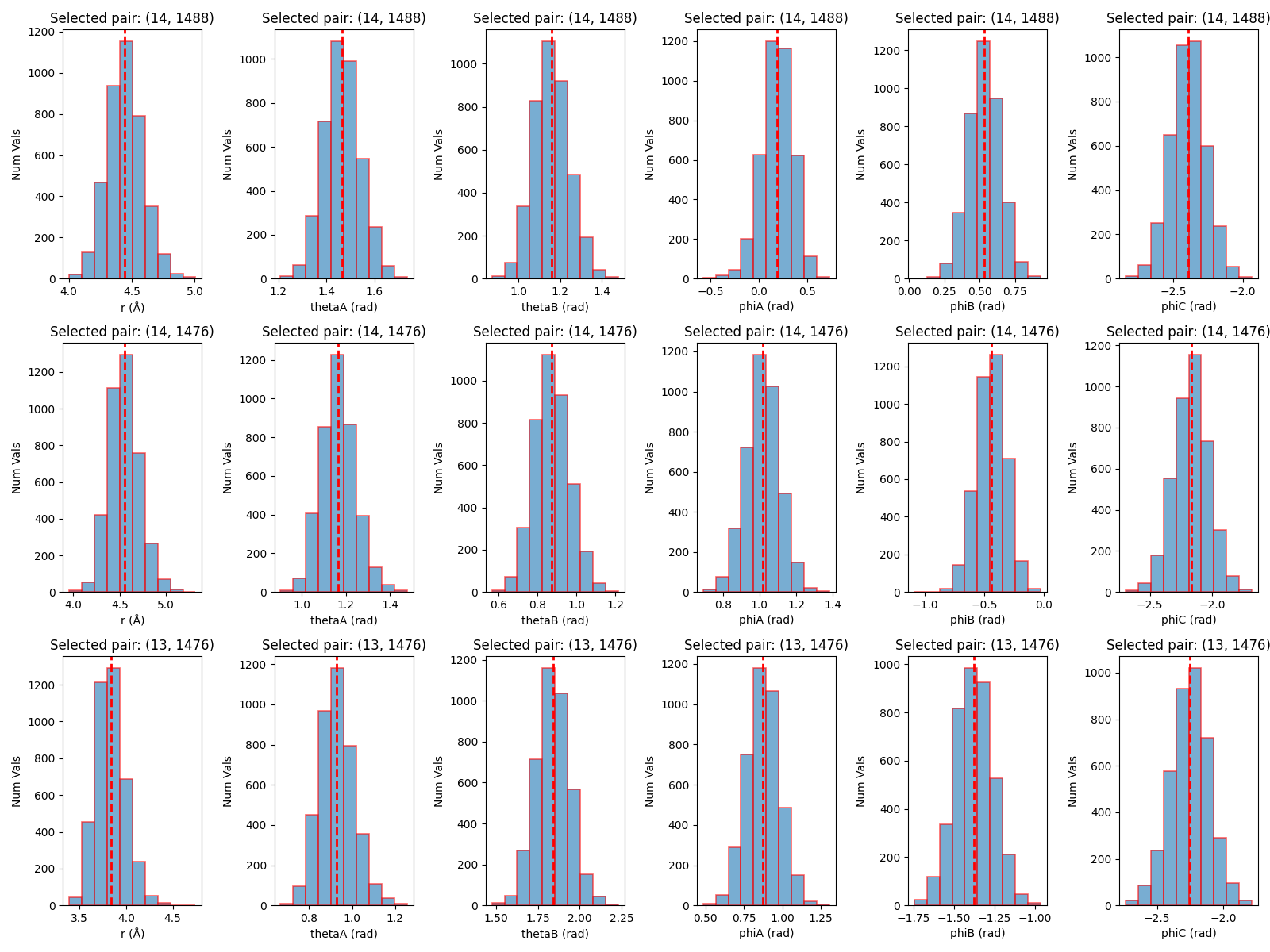
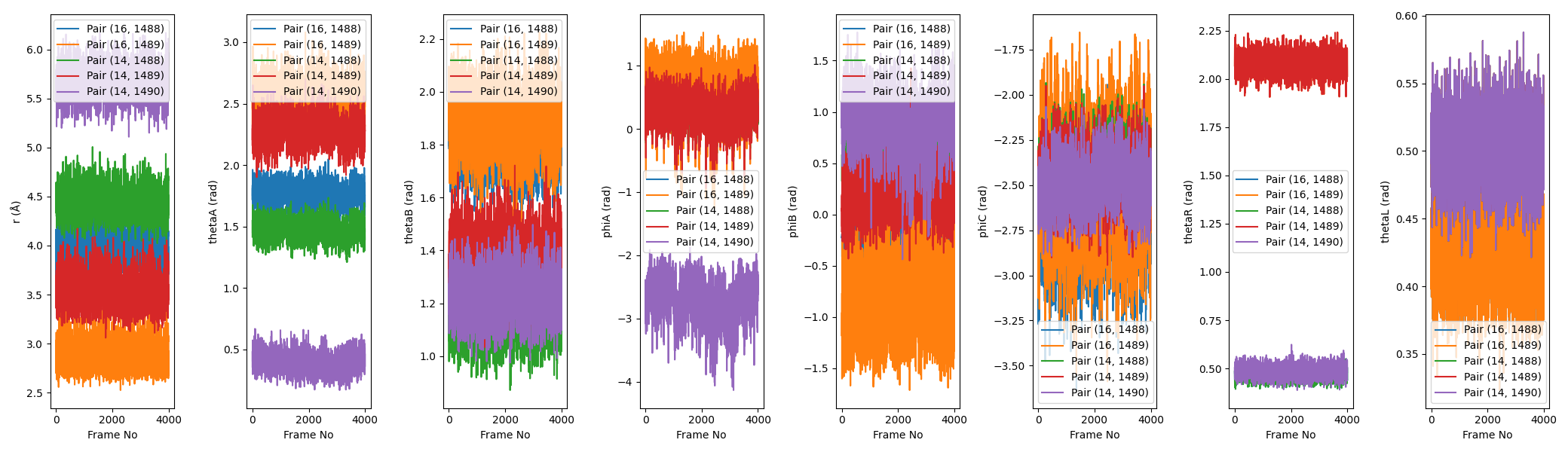
There are two image files that are generated by the script.
The first is boresch_histograms.png, which shows the histograms of the distance, angle, and dihedral values for the selected atoms over the course of the trajectory. This is useful for visualizing how well the selected atoms maintain their relative positions and orientations.
The second image is boresch_timeseries.png, which shows the time series of the distance, angle, and dihedral values for the selected atoms over the course of the trajectory. This is useful for visualizing how stable the selected atoms are over time.
The final output is the rest.in file, which contains the necessary restraint information for use in an Amber simulation. This file includes the atom indices, equilibrium values, and force constants for the Boresch restraints.
An example of the rest.in file generated is shown below:
&rst iat=1477,16,0
  r1=0.00000,r2=5.62704,r3=5.62704,r4=999.000,rk2=7.55, rk3=7.55/
&rst iat=1475,1477,16,0
  r1=0.00000,r2=72.87935,r3=72.87935,r4=180.000,rk2=49.42, rk3=49.42/
&rst iat=1477,16,11,0
  r1=0.00000,r2=101.39821,r3=101.39821,r4=180.000,rk2=58.05, rk3=58.05/
&rst iat=1479,1475,1477,16,0
  r1=-180.00000,r2=49.83917,r3=49.83917,r4=180.000,rk2=37.33, rk3=37.33/
&rst iat=1475,1477,16,11,0
  r1=-180.00000,r2=-74.38683,r3=-74.38683,r4=180.000,rk2=26.64, rk3=26.64/
&rst iat=1477,16,11,15,0
  r1=-180.00000,r2=31.60116,r3=31.60116,r4=180.000,rk2=26.79, rk3=26.79/
Tip
The rest.in file should look familiar to you if you are familiar with Amber’s NMR restraint format, as Boresch restraints are implemented using the same underlying machinery.
Specifically, each &rst block in the rest.in file corresponds to a specific restraint type (distance, angle, dihedral) and contains the necessary parameters for that restraint.
You can tell what type of restraint it is based on the number of atoms involved:
Distance restraints involve 2 atoms
Angle restraints involve 3 atoms
Dihedral restraints involve 4 atoms
So the first line in rest.in is a distance restraint, since iat=1489,15.
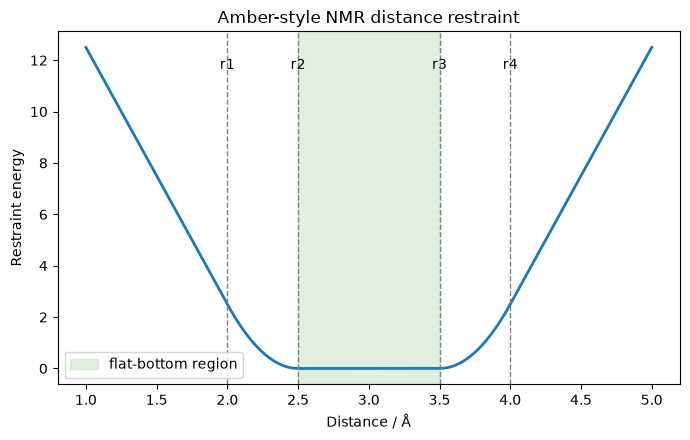
Now, the line after the &rst marker specifies the restraint values. Specifically, the fields always are:
r1: the lower bound where the restraint should reach infinity
r2: a mid-point of the restraint well where it should start taking effect (on its way to r1)
r3: another mid-point of the restraint well where it should start taking effect (on its way to r4)
r4: the upper bound where the restraint should reach infinity
rk2: the force constant for the left side of the well (between r1 and r2)
rk3: the force constant for the right side of the well (between r3 and r4)
Below is a code block you can use to plot NMR-style restraints.
import numpy as np
import matplotlib.pyplot as plt

def amber_nmr_restraint(x, r1, r2, r3, r4, rk2, rk3):
    """Approximate Amber-style NMR restraint potential.

    Flat-bottom between r2 and r3.
    Harmonic walls between r1-r2 and r3-r4.
    Linear continuation outside r1 and r4.
    """
    x = np.asarray(x)
    e = np.zeros_like(x, dtype=float)

    left_outer = x < r1
    left_harm = (x >= r1) & (x < r2)
    flat = (x >= r2) & (x <= r3)
    right_harm = (x > r3) & (x <= r4)
    right_outer = x > r4

    # Harmonic regions
    e[left_harm] = rk2 * (x[left_harm] - r2) ** 2
    e[right_harm] = rk3 * (x[right_harm] - r3) ** 2

    # Linear extensions beyond r1 and r4
    e[left_outer] = (
        rk2 * (r1 - r2) ** 2
        + 2.0 * rk2 * (r1 - r2) * (x[left_outer] - r1)
    )
    e[right_outer] = (
        rk3 * (r4 - r3) ** 2
        + 2.0 * rk3 * (r4 - r3) * (x[right_outer] - r4)
    )

    return e

# Example "distance restraint" parameters, Amber style
r1, r2, r3, r4 = 2.0, 2.5, 3.5, 4.0
rk2, rk3 = 10.0, 10.0

x = np.linspace(1.0, 5.0, 600)
y = amber_nmr_restraint(x, r1, r2, r3, r4, rk2, rk3)

fig, ax = plt.subplots(figsize=(7, 4.5))
ax.plot(x, y, lw=2, color="tab:blue")

for val, label in [(r1, "r1"), (r2, "r2"), (r3, "r3"), (r4, "r4")]:
    ax.axvline(val, color="gray", ls="--", lw=1)
    ax.text(val, ax.get_ylim()[1] * 0.92, label, ha="center", va="top")

ax.axvspan(r2, r3, color="tab:green", alpha=0.15, label="flat-bottom region")
ax.set_xlabel("Distance / Å")
ax.set_ylabel("Restraint energy")
ax.set_title("Amber-style NMR distance restraint")
ax.legend()
fig.tight_layout()
plt.show()
Note
In between r2 and r3, there is no force applied (though, here you’ll note for all restraints r2=r3, meaning the well is harmonic in all cases.)
With these Boresch restraints generated, you are now ready to use them in your ABFE calculations!
10.2.3. Determining the Boresch Restraint Contribution to the Free Energy
To properly account for the contribution of Boresch restraints to the free energy in ABFE calculations, we need to calculate the free energy associated with applying these restraints.
This can be done using the following formula:
or
Here, \(V_0\) is the standard state volume (e.g. 1660 Å^3 for a 1 M standard state), \(r_{a,A,0}\) is the equilibrium distance between the anchor atoms in the Boresch restraint, \(\theta_{A,0}\) and \(\theta_{B,0}\) are the equilibrium angles defined by the anchor atoms and the ligand atom in the Boresch restraint, and \(K_r\), \(K_{\theta_A}\), \(K_{\theta_B}\), \(K_{\phi_A}\), \(K_{\phi_B}\), and \(K_{\phi_C}\) are the force constants for the distance, angle, and dihedral components of the Boresch restraint. The first formula is used when the potential is defined as K*(x-x0)^2, and the second formula is used when the potential is defined as 0.5*K*(x-x0)^2 (i.e. when there is a 0.5 factor included in the potential).
Warning
Amber defines the Boresch restraint potential as K*(x-x0)^2, which does not include the 0.5 factor. Therefore, when calculating the contribution of Boresch restraints to the free energy for Amber simulations, you should use the first formula and not include the 0.5 factor in the force constants.
In this activity, you will learn how to calculate this free energy contribution using the parameters from an example Boresch restraint for the Tyk2 system.
First, however, we need code for calculating the Boresch restraint contribution to the free energy. If you are using FE-Toolkit, there is a script that is used to automatically calculate this value (edgembar/src/python/lib/edgembar/VBA.py); however, we have included a standalone script below that you can use to calculate the contribution by hand.
Let’s start with a simple example from the literature. In the recent paper by Boresch, “On the Analytical Corrections for Restraints in Absolute Binding Free Energy Calculations”, Boresch[1] Boresch defines a Boresch restraint with the following parameters:
\(K_r\) = 5.0 kcal/mol/Å^2
\(K_{\theta_A}=K_{\theta_B}\) = 5.0 kcal/mol/rad^2
\(K_{\phi_A}=K_{\phi_B}=K_{\phi_C}\) = 2.5 kcal/mol/rad^2
\(r_0\) = 5.1 Å
\(\theta_{A,0}\) = 67.5 degrees
\(\theta_{B,0}\) = 84.5 degrees
Below is an example python script you can download and try. First try entering the parameters from the Boresch paper to see if you can reproduce the value of \(\Delta A_{rest,BOR2003}\) reported in the paper. The output should be around \(-6.27 kcal/mol\) (which matches the table). Note - when asked about whether the \(0.5\) factor is included in the potential, answer “n” or “no” since the potential used in the Boresch paper does not include the \(0.5\) factor.
import numpy as np

# Constants
kt = 300.0 * 8.314 / 4184.0   # kcal/mol
V0 = 1660.0                   # Å^3

# User option
use_half = input("Does your restraint potential include 0.5*K*(x-x0)^2? [y/n]: ").strip().lower()

if use_half in ["y", "yes"]:
    c = 0.5
elif use_half in ["n", "no"]:
    c = 1.0
else:
    raise ValueError("Please enter 'y' or 'n'.")

# Inputs
r0 = float(input("r0 (Å): "))

thetaA0_deg = float(input("thetaA0 (degrees): "))
thetaB0_deg = float(input("thetaB0 (degrees): "))

k_r = float(input("k_r (kcal/mol/Å^2): "))
k_thetaA = float(input("k_thetaA (kcal/mol/rad^2): "))
k_thetaB = float(input("k_thetaB (kcal/mol/rad^2): "))
k_phiA = float(input("k_phiA (kcal/mol/rad^2): "))
k_phiB = float(input("k_phiB (kcal/mol/rad^2): "))
k_phiC = float(input("k_phiC (kcal/mol/rad^2): "))

# Convert angles to radians
thetaA0 = np.deg2rad(thetaA0_deg)
thetaB0 = np.deg2rad(thetaB0_deg)

# Effective force constants in the Boltzmann factor:
# exp[-beta * c*K*(x-x0)^2]
k_r_eff = c * k_r
k_thetaA_eff = c * k_thetaA
k_thetaB_eff = c * k_thetaB
k_phiA_eff = c * k_phiA
k_phiB_eff = c * k_phiB
k_phiC_eff = c * k_phiC

# Boresch RRHO correction
prefactor = (8 * np.pi**2 * V0) / (
    r0**2 * np.sin(thetaA0) * np.sin(thetaB0)
)

force_term = np.sqrt(
    k_r_eff *
    k_thetaA_eff *
    k_thetaB_eff *
    k_phiA_eff *
    k_phiB_eff *
    k_phiC_eff
) / ((np.pi * kt) ** 3)

delta_A = -kt * np.log(prefactor * force_term)

print()
print(f"kt = {kt:.8f} kcal/mol")
print(f"0.5 factor included: {use_half in ['y', 'yes']}")
print(f"Delta A_rest = {delta_A:.6f} kcal/mol")
Below, we have included a sample input file for a Boresch restraint that was generated in the Boresch restraints tutorial.
&rst iat=1477,16,0
  r1=0.00000,r2=5.62704,r3=5.62704,r4=999.000,rk2=7.55, rk3=7.55/
&rst iat=1475,1477,16,0
  r1=0.00000,r2=72.87935,r3=72.87935,r4=180.000,rk2=49.42, rk3=49.42/
&rst iat=1477,16,11,0
  r1=0.00000,r2=101.39821,r3=101.39821,r4=180.000,rk2=58.05, rk3=58.05/
&rst iat=1479,1475,1477,16,0
  r1=-180.00000,r2=49.83917,r3=49.83917,r4=180.000,rk2=37.33, rk3=37.33/
&rst iat=1475,1477,16,11,0
  r1=-180.00000,r2=-74.38683,r3=-74.38683,r4=180.000,rk2=26.64, rk3=26.64/
&rst iat=1477,16,11,15,0
  r1=-180.00000,r2=31.60116,r3=31.60116,r4=180.000,rk2=26.79, rk3=26.79/
Try entering the parameters from this file into the script above to calculate the contribution of the Boresch restraint to the free energy for your Tyk2 ligand. Here, the parameters should also use “n” for the \(0.5\) factor since in Amber the potential is defined as \(K*(x-x0)^2\). The value you get should be around \(-9.89\) kcal/mol, which matches the value calculated by FE-Toolkit for this restraint.
Delta A_rest = -9.894525 kcal/mol
Note
The following activity is a demonstration of how you would annihilate a binder in the context of an absolute binding free energy calculation. The activity is not intended to be run in its entirety during the workshop, but rather to illustrate the steps involved in setting up and running such a calculation.
For the following activity, you will be using the abfe subdirectory. You’ll also potentially want an interactive node with a gpu for the calculations.
{{INTERACTIVE_GPU_2}}
On the cluster, you can run the following modules to set up your environment for this activity:
module purge
{{AMBERLOAD}}
10.2.4. Setting Up and Running Annihilation Simulations
Note
This tutorial provides files for both the binder and the complex setup stages for an ABFE run; however, the actual setup is nearly identical. For the purposes of learning, proceeding with solely the complex stage is likely enough to understand.
For this activity, we will need two things to get started. The first is configurations for the end-state (see Equilibrating Endstates in ABFE Calculations (Tyk2) for an example); and the second is the Boresch restraint files (see Creating Boresch Restraints for ABFE Calculations (Tyk2)). For your convenience, we have provided the necessary files below to get you started.
Attention
10.2.4.1. Choosing A Lambda Schedule
The first step in setting up an ABFE calculation is to define a lambda schedule. For the purposes of this activity we will use a simple linear lambda schedule with 11 windows.
Warning
A linear lambda schedule is usually not optimal for ABFE calculations, and ABFE calculations often need far more than 11 windows to converge. This activity is meant to demonstrate the basic steps of setting up and running an ABFE calculation, and is not intended to produce converged or realistic results.
The lambda schedule we will use is as follows:
Window  Lambda Value
---------------------
  0        0.0
  1        0.1
  2        0.2
  3        0.3
  4        0.4
  5        0.5
  6        0.6
  7        0.7
  8        0.8
  9        0.9
 10        1.0
10.2.4.2. Annihilation Simulation Setup
With a lambda schedule in place, we can now slowly annihilate the ligand from the equilibrated complex and binder end-states. Roughly, in both cases this involves starting from the end-state where \(\lambda = 0\) and gradually turning off the ligand’s interactions with its environment until it is fully decoupled at \(\lambda = 1\).
&cntrl
imin = 1,
maxcyc = 5000,
ncyc = 100,
ntx = 1,
ntmin = 2,
ntwe = 0,
ntwr = 0,
ntpr = 1000,
ntb = 1,
ntp = 0,
cut = 10.0,
ntr = 0,
ioutfm=1,
ntxo=1,

ifsc            = 1
icfe            = 1

clambda         = REPLACE_WITH_LAMBDA
timask1         = ':1'
timask2         = ''
scmask1         = ':1'
scmask2         = ''
scalpha         = 0.5
scbeta          = 1.0

gti_cut         = 1
gti_output      = 1
gti_add_sc      = 25
gti_scale_beta  = 1
gti_cut_sc_on   = 8
gti_cut_sc_off  = 10
gti_lam_sch     = 1
gti_ele_sc      = 1
gti_vdw_sc      = 1
gti_cut_sc      = 2
gti_ele_exp     = 2
gti_vdw_exp     = 2
gti_syn_mass    = 0
gremd_acyc      = 1

gti_bat_sc      = -1
/
&cntrl
imin = 1,
maxcyc = 5000,
ncyc = 100,
ntx = 1,
ntmin = 2,
ntwe = 0,
ntwr = 0,
ntpr = 1000,
ntb = 1,
ntp = 0,
cut = 10.0,
ntr = 0,
ioutfm=1,
ntxo=1,

ifsc            = 1
icfe            = 1

clambda         = REPLACE_WITH_LAMBDA
timask1         = ':1'
timask2         = ''
scmask1         = ':1'
scmask2         = ''
scalpha         = 0.5
scbeta          = 1.0

gti_cut         = 1
gti_output      = 1
gti_add_sc      = 25
gti_scale_beta  = 1
gti_cut_sc_on   = 8
gti_cut_sc_off  = 10
gti_lam_sch     = 1
gti_ele_sc      = 1
gti_vdw_sc      = 1
gti_cut_sc      = 2
gti_ele_exp     = 2
gti_vdw_exp     = 2
gti_syn_mass    = 0
gremd_acyc      = 1

gti_bat_sc      = -1
nmropt          = 1
/
&wt type = 'END', /
DISANG=rest.in
/
Above, we have included the mdin files used to annihilate the ligand in both the binder and the complex environments. Note that these mdin files contain a placeholder for the specific lambda value for each window. This is REPLACE_WITH_LAMBDA.
We will start by generating the lambda windows for both the binder and complex annihilation simulations. To do this, we will start with our simple lambda schedule defined above.
Start by creating a working directory for these steps within the abfe directory. We will make separate directories for the binder and complex annihilation simulations within this folder.
mkdir working_dir
cd working_dir
mkdir binder complex
cp ../binder_mdins/binder-run.slurm binder/
cp ../complex_mdins/complex-run.slurm complex/
Next, we will use a bash for loop to generate the mdin files for each lambda window for both the binder and complex annihilation simulations.
# Binder Annihilation Windows
lambda_values=(0.0 0.1 0.2 0.3 0.4 0.5 0.6 0.7 0.8 0.9 1.0)
for i in ${!lambda_values[@]}
do
   lambda_value=${lambda_values[$i]}
   sed "s/REPLACE_WITH_LAMBDA/$lambda_value/g" ../binder_mdins/annhilate.mdin > binder/annihilate_lambda_${i}.mdin
done

# Complex Annihilation Windows
for i in ${!lambda_values[@]}
do
   lambda_value=${lambda_values[$i]}
   sed "s/REPLACE_WITH_LAMBDA/$lambda_value/g" ../complex_mdins/annhilate.mdin > complex/annihilate_lambda_${i}.mdin
done
Now, you should have 11 mdin files for both the binder and complex annihilation simulations, each corresponding to a different lambda window.
Now, we can proceed to run these lambda windows iteratively starting from the \(\lambda = 0\) window and moving to the next window using the output of the previous window as input.
We will start with the binder simulations. Here, we will use the equilibrated end-state files (provided with the activity files) as input for the first window (\(\lambda = 0\)), and then use the output of each window as input for the next window.
cd binder
# Run Lambda Windows Iteratively
for i in {0..10}
do
   if [ $i -eq 0 ]
   then
      # First window uses equilibrated end-state files
      pmemd.cuda -O -i annihilate_lambda_${i}.mdin -p  ../../topology/binder_ejm_31_hmr.parm7 -c ../../topology/binder_ejm_31_unrestrained.rst7 -o annihilate_binder_${i}.mdout -r annihilate_binder_${i}.rst7 -x annihilate_binder_${i}_traj.nc -ref ../../topology/binder_ejm_31_unrestrained.rst7
   else
      # Subsequent windows use output of previous window
      pmemd.cuda -O -i annihilate_lambda_${i}.mdin -p ../../topology/binder_ejm_31_hmr.parm7 -c annihilate_binder_$((i-1)).rst7 -o annihilate_binder_${i}.mdout -r annihilate_binder_${i}.rst7 -x annihilate_binder_${i}_traj.nc -ref annihilate_binder_$((i-1)).rst7
   fi
done
A slurm version of this script can be submitted (however it will take a long time). This script is binder-run.slurm.
sbatch binder-run.slurm
These commands will run the binder annihilation simulations for each lambda window iteratively. These are minimizations, and thus are relatively quick to run.
For the complex simulations, we will follow the same procedure, except we also need to include the Boresch restraint rest.in file, as well as the lambda.sch file that defines how the restraints are scaled during the annihilation process.
This lambda.sch file controls how the Boresch restraints are scaled during the annihilation process to ensure that the ligand remains properly restrained as its interactions with the environment are turned off.
TypeRestBA, smooth_step2, symmetric, 1.0, 0.0
Warning
The lambda.sch file is essential for the proper scaling of Boresch restraints during the annihilation process. In the example
TypeRestBA, smooth_step2, symmetric, 1.0, 0.0, the final two numbers indicate that the restraint is fully on at \(\lambda = 1.0\)
and off at \(\lambda = 0.0\). If this file is not included, the restraints will be applied to the real state and then slowly turned off,
which is exactly the opposite of what we want to achieve. This is a very common mistake when setting up ABFE calculations with Boresch restraints,
and will lead to incorrect results.
Thus, we will copy these files into the complex working directory before running the simulations.
cd ../complex
cp ../../boresch_restraints/rest.in .
cp ../../boresch_restraints/lambda.sch .
# Run Lambda Windows Iteratively
for i in {0..10}
do
   if [ $i -eq 0 ]
   then
      # First window uses equilibrated end-state files
      pmemd.cuda -O -i annihilate_lambda_${i}.mdin -p ../../topology/target_ejm_31_hmr.parm7 -c ../../topology/complex_ejm_31_unrestrained.rst7 -o annihilate_complex_${i}_out.log -r annihilate_complex_${i}.rst7 -x annihilate_complex_${i}.nc -ref ../../topology/complex_ejm_31_unrestrained.rst7
   else
      # Subsequent windows use output of previous window
      pmemd.cuda -O -i annihilate_lambda_${i}.mdin -p ../../topology/target_ejm_31_hmr.parm7 -c annihilate_complex_$((i-1)).rst7 -o annihilate_complex_${i}.mdout -r annihilate_complex_${i}.rst7 -x annihilate_complex_${i}.nc -ref annihilate_complex_$((i-1)).rst7
   fi
done
These can be submitted as a slurm job as well, using complex-run.slurm.
sbatch complex-run.slurm
These calculations will run relatively quickly, as they are minimizations. After this, we can move on to equilibrating the lambda windows.
Note
The remainder of this tutorial shows a typical workflow for equilibrating lambda windows; however, such equilibrations are often long and not ideal for a workshop setting. As such - look through the remaining sections however running the simulations would take a few hours to complete.
10.2.5. Equilibrating the Lambda Windows
We will now equilibrate each of the lambda windows generated in the previous step. Unlike the annihilation simulations, we will run the equilibration simulations for each lambda window in parallel, as they are independent of each other. Currently, these parallel runs will not be using replica exchange - replica exchange won’t turn on until the production phase.
10.2.5.1. Binder Equilibration
We will again start with the binder, equilibrating each lambda window using the corresponding mdin files provided below.
&cntrl
imin            = 0
nstlim          = 100000
dt              = 0.001
irest           = 0
ntx             = 1
ntxo            = 1
ntc             = 2
ntf             = 1
ntwx            = 0
ntwr            = 0
ntpr            = 125
cut             = 10.0
iwrap           = 0

ntb             = 1
ntp             = 0

tempi           = 200
temp0           = 298
ntt             = 3
gamma_ln        = 5.0
barostat        = 2
pres0           = 1.01325
taup            = 1

rmsd_mask(1)    = ':1 & !@H='
rmsd_strength(1)= 0
rmsd_ti(1)      = 2
rmsd_type       = 0

ig              = -1

ifsc            = 1
icfe            = 1

clambda         = REPLACE_WITH_LAMBDA
timask1         = ':1'
timask2         = ''
crgmask         = ""
scmask1         = ':1'
scmask2         = ''
scalpha         = 0.5
scbeta          = 1.0

gti_cut         = 1
gti_output      = 1
gti_add_sc      = 25
gti_scale_beta  = 1
gti_cut_sc_on   = 8
gti_cut_sc_off  = 10
gti_lam_sch     = 1
gti_ele_sc      = 1
gti_vdw_sc      = 1
gti_cut_sc      = 2
gti_ele_exp     = 2
gti_vdw_exp     = 2
gti_syn_mass    = 0
gremd_acyc      = 1

/
&wt
TYPE='TEMP0',
ISTEP1=0, ISTEP2=100000,
VALUE1=200, VALUE2=298,
&cntrl
imin            = 0
nstlim          = 50000
dt              = 0.002
irest           = 1
ntx             = 5
ntxo            = 1
ntc             = 2
ntf             = 1
ntwx            = 0
ntwr            = 0
ntpr            = 125
cut             = 10.0
iwrap           = 0

ntb             = 1
ntp             = 0

tempi           = 298
temp0           = 298
ntt             = 3
gamma_ln        = 5.0
barostat        = 2
pres0           = 1.01325
taup            = 1

ig              = -1

ifsc            = 1
icfe            = 1

rmsd_mask(1)    = ':1 & !@H='
rmsd_strength(1)= 0
rmsd_ti(1)      = 2
rmsd_type       = 0

clambda         = REPLACE_WITH_LAMBDA
timask1         = ':1'
timask2         = ''
crgmask         = ""
scmask1         = ':1'
scmask2         = ''
scalpha         = 0.5
scbeta          = 1.0

gti_cut         = 1
gti_output      = 1
gti_add_sc      = 25
gti_scale_beta  = 1
gti_cut_sc_on   = 8
gti_cut_sc_off  = 10
gti_lam_sch     = 1
gti_ele_sc      = 1
gti_vdw_sc      = 1
gti_cut_sc      = 2
gti_ele_exp     = 2
gti_vdw_exp     = 2
gti_syn_mass    = 0
gremd_acyc      = 1

/
&cntrl
imin            = 0
nstlim          = 250000
dt              = 0.004
irest           = 1
ntx             = 5
ntxo            = 1
ntc             = 2
ntf             = 1
ntwx            = 0
ntwr            = 0
ntpr            = 125
cut             = 10.0
iwrap           = 0

ntb             = 1
ntp             = 0

tempi           = 298
temp0           = 298
ntt             = 3
gamma_ln        = 5.0
barostat        = 2
pres0           = 1.01325
taup            = 1

ig              = -1

ifsc            = 1
icfe            = 1

rmsd_mask(1)    = ':1 & !@H='
rmsd_strength(1)= 0
rmsd_ti(1)      = 2
rmsd_type       = 0

clambda         = REPLACE_WITH_LAMBDA
timask1         = ':1'
timask2         = ''
crgmask         = ""
scmask1         = ':1'
scmask2         = ''
scalpha         = 0.5
scbeta          = 1.0

gti_cut         = 1
gti_output      = 1
gti_add_sc      = 25
gti_scale_beta  = 1
gti_cut_sc_on   = 8
gti_cut_sc_off  = 10
gti_lam_sch     = 1
gti_ele_sc      = 1
gti_vdw_sc      = 1
gti_cut_sc      = 2
gti_ele_exp     = 2
gti_vdw_exp     = 2
gti_syn_mass    = 0
gremd_acyc      = 1

/
Tip
These equilibration mdin files contain a placeholder for the specific lambda value for each window. This is REPLACE_WITH_LAMBDA.
Warning
Remember that mdin files REQUIRE a blank line at the end of the file to function properly with Amber. If you get an error that there was an unexpected end of file while reading the mdin, check to make sure there is a blank line at the end of your mdin file. If you use the provided mdin files, they already have this blank line.
Just like before, we will generate the mdins programmatically for each lambda window using a bash for loop.
cd ../binder
# Generate Equilibration MDINs for Each Lambda Window
lambda_values=(0.0 0.1 0.2 0.3 0.4 0.5 0.6 0.7 0.8 0.9 1.0)
for i in {0..10}
do
   lambda_value=${lambda_values[$i]}
   sed "s/REPLACE_WITH_LAMBDA/$lambda_value/g" ../../binder_mdins/heat.mdin > heat_lambda_${i}.mdin
   sed "s/REPLACE_WITH_LAMBDA/$lambda_value/g" ../../binder_mdins/equil1.mdin > equil1_lambda_${i}.mdin
   sed "s/REPLACE_WITH_LAMBDA/$lambda_value/g" ../../binder_mdins/equil2.mdin > equil2_lambda_${i}.mdin
done
Now, we also need a group file for the replica exchange simulations. This file will look a lot like the pmemd.cuda command calls that we made before, except the group file will contain all of the lambda windows to be run in parallel.
The script below will generate the group file for the binder equilibration simulations.
rm binder_heat_groupfile.in binder_equil1_groupfile.in binder_equil2_groupfile.in
for i in {0..10}
do
   echo "-O -i heat_${i}.mdin -p ../../topology/binder_ejm_31_hmr.parm7 -c annihilate_binder_${i}.rst7 -o binder_heat_${i}.mdout -r binder_heat_${i}.rst7 -x binder_heat_${i}.nc -ref ../../topology/binder_ejm_31_unrestrained.rst7" >> binder_heat_groupfile.in
   echo "-O -i equil1_${i}.mdin -p ../../topology/binder_ejm_31_hmr.parm7 -c binder_heat_${i}.rst7 -o binder_equil1_${i}.mdout -r binder_equil1_${i}.rst7 -x binder_equil1_${i}.nc -ref ../../topology/binder_ejm_31_unrestrained.rst7" >> binder_equil1_groupfile.in
   echo "-O -i equil2_${i}.mdin -p ../../topology/binder_ejm_31_hmr.parm7 -c binder_equil1_${i}.rst7 -o binder_equil2_${i}.mdout -r binder_equil2_${i}.rst7 -x binder_equil2_${i}.nc -ref ../../topology/binder_ejm_31_unrestrained.rst7" >> binder_equil2_groupfile.in
done
Now we can run these calculations in parallel using pmemd.cuda.MPI.
mpirun -np 11 pmemd.cuda.MPI -ng 11 -groupfile binder_heat_groupfile.in
mpirun -np 11 pmemd.cuda.MPI -ng 11 -groupfile binder_equil1_groupfile.in
mpirun -np 11 pmemd.cuda.MPI -ng 11 -groupfile binder_equil2_groupfile.in
Hint
Here, note that the usual pmemd commands are included in the group file. On the actual command line, our calls are much simpler now.
Take this for example:
mpirun -np 11 pmemd.cuda.MPI -ng 11 -groupfile binder_heat_groupfile.in
mpirun -np 11: This tells mpirun to use 11 processes (one for each lambda window).
pmemd.cuda.MPI: This is the MPI-enabled version of pmemd.cuda, which allows for parallel execution across multiple processes.
-ng 11: This flag specifies the number of groups (or simulations) to run in parallel, which is 11 in this case.
-groupfile binder_heat_groupfile.in: This specifies the group file that contains the individual pmemd commands for each lambda window. We generated this file in the previous step.
While these won’t take too long to run, they will take longer than the annihilation simulations, as these are full MD simulations (on the order of an hour).
10.2.5.2. Complex Equilibration
&cntrl
imin            = 0
nstlim          = 100000
dt              = 0.001
irest           = 0
ntx             = 1
ntxo            = 1
ntc             = 2
ntf             = 1
ntwx            = 0
ntwr            = 0
ntpr            = 125
cut             = 10.0
iwrap           = 0

ntb             = 1
ntp             = 0

tempi           = 200
temp0           = 298
ntt             = 3
gamma_ln        = 5.0
barostat        = 2
pres0           = 1.01325
taup            = 1

rmsd_mask(1)    = ':1 & !@H='
rmsd_strength(1)= 0
rmsd_ti(1)      = 2
rmsd_type       = 0
rmsd_mask(2)    = '@CA '
rmsd_strength(2)= 0
rmsd_ti(2)      = 3

ig              = -1

ifsc            = 1
icfe            = 1

clambda         = REPLACE_WITH_LAMBDA
timask1         = ':1'
timask2         = ''
crgmask         = ""
scmask1         = ':1'
scmask2         = ''
scalpha         = 0.5
scbeta          = 1.0

gti_cut         = 1
gti_output      = 1
gti_add_sc      = 25
gti_scale_beta  = 1
gti_cut_sc_on   = 8
gti_cut_sc_off  = 10
gti_lam_sch     = 1
gti_ele_sc      = 1
gti_vdw_sc      = 1
gti_cut_sc      = 2
gti_ele_exp     = 2
gti_vdw_exp     = 2
gti_syn_mass    = 0
gremd_acyc      = 1

gti_bat_sc      = -1
nmropt          = 1
mbar_lambda(1) = 0.00000
mbar_lambda(2) = 0.10000
mbar_lambda(3) = 0.20000
mbar_lambda(4) = 0.30000
mbar_lambda(5) = 0.40000
mbar_lambda(6) = 0.50000
mbar_lambda(7) = 0.60000
mbar_lambda(8) = 0.70000
mbar_lambda(9) = 0.80000
mbar_lambda(10) = 0.90000
mbar_lambda(11) = 1.00000
/
&wt type = 'END',
/
DISANG=rest.in
&wt
TYPE='TEMP0',
ISTEP1=0, ISTEP2=100000,
VALUE1=200, VALUE2=298,
&cntrl
imin            = 0
nstlim          = 50000
dt              = 0.002
irest           = 1
ntx             = 5
ntxo            = 1
ntc             = 2
ntf             = 1
ntwx            = 0
ntwr            = 0
ntpr            = 125
cut             = 10.0
iwrap           = 0

ntb             = 1
ntp             = 0

tempi           = 298
temp0           = 298
ntt             = 3
gamma_ln        = 5.0
barostat        = 2
pres0           = 1.01325
taup            = 1

rmsd_mask(1)    = ':1 & !@H='
rmsd_strength(1)= 0
rmsd_ti(1)      = 2
rmsd_type       = 0
rmsd_mask(2)    = '@CA '
rmsd_strength(2)= 0
rmsd_ti(2)      = 3

ig              = -1

ifsc            = 1
icfe            = 1


clambda         = REPLACE_WITH_LAMBDA
timask1         = ':1'
timask2         = ''
crgmask         = ""
scmask1         = ':1'
scmask2         = ''
scalpha         = 0.5
scbeta          = 1.0

gti_cut         = 1
gti_output      = 1
gti_add_sc      = 25
gti_scale_beta  = 1
gti_cut_sc_on   = 8
gti_cut_sc_off  = 10
gti_lam_sch     = 1
gti_ele_sc      = 1
gti_vdw_sc      = 1
gti_cut_sc      = 2
gti_ele_exp     = 2
gti_vdw_exp     = 2
gti_syn_mass    = 0
gremd_acyc      = 1

gti_bat_sc      = -1
nmropt          = 1
/
&wt type = 'END', /
DISANG=rest.in
&cntrl
imin            = 0
nstlim          = 250000
dt              = 0.004
irest           = 1
ntx             = 5
ntxo            = 1
ntc             = 2
ntf             = 1
ntwx            = 0
ntwr            = 0
ntpr            = 125
cut             = 10.0
iwrap           = 0

ntb             = 1
ntp             = 0

tempi           = 298
temp0           = 298
ntt             = 3
gamma_ln        = 5.0
barostat        = 2
pres0           = 1.01325
taup            = 1

rmsd_mask(1)    = ':1 & !@H='
rmsd_strength(1)= 0
rmsd_ti(1)      = 2
rmsd_type       = 0
rmsd_mask(2)    = '@CA '
rmsd_strength(2)= 0
rmsd_ti(2)      = 3

ig              = -1

ifsc            = 1
icfe            = 1


clambda         = REPLACE_WITH_LAMBDA
timask1         = ':1'
timask2         = ''
crgmask         = ""
scmask1         = ':1'
scmask2         = ''
scalpha         = 0.5
scbeta          = 1.0

gti_cut         = 1
gti_output      = 1
gti_add_sc      = 25
gti_scale_beta  = 1
gti_cut_sc_on   = 8
gti_cut_sc_off  = 10
gti_lam_sch     = 1
gti_ele_sc      = 1
gti_vdw_sc      = 1
gti_cut_sc      = 2
gti_ele_exp     = 2
gti_vdw_exp     = 2
gti_syn_mass    = 0
gremd_acyc      = 1

gti_bat_sc      = -1
nmropt          = 1
/
&wt type = 'END', /
DISANG=rest.in
As with the binder, we will generate the mdins programmatically for each lambda window using a bash for loop.
cd ../complex
# Generate Equilibration MDINs for Each Lambda Window
lambda_values=(0.0 0.1 0.2 0.3 0.4 0.5 0.6 0.7 0.8 0.9 1.0)
for i in {0..10}
do
   lambda_value=${lambda_values[$i]}
   sed "s/REPLACE_WITH_LAMBDA/$lambda_value/g" ../../complex_mdins/heat.mdin > heat_${i}.mdin
   sed "s/REPLACE_WITH_LAMBDA/$lambda_value/g" ../../complex_mdins/equil1.mdin > equil1_${i}.mdin
   sed "s/REPLACE_WITH_LAMBDA/$lambda_value/g" ../../complex_mdins/equil2.mdin > equil2_${i}.mdin
done
Now, we also need a group file for the replica exchange simulations. This file will look a lot like the pmemd.cuda command calls that we made before, except the group file will contain all of the lambda windows to be run in parallel.
The script below will generate the group file for the complex equilibration simulations.
rm complex_heat_groupfile.in complex_equil1_groupfile.in complex_equil2_groupfile.in
for i in {0..10}
do
   echo "-O -i heat_${i}.mdin -p ../../topology/complex_ejm_31_hmr.parm7 -c annihilate_complex_${i}.rst7 -o complex_heat_${i}.mdout -r complex_heat_${i}.rst7 -x complex_heat_${i}.nc -ref ../../topology/complex_ejm_31_unrestrained.rst7" >> complex_heat_groupfile.in
   echo "-O -i equil1_${i}.mdin -p ../../topology/complex_ejm_31_hmr.parm7 -c complex_heat_${i}.rst7 -o complex_equil1_${i}.mdout -r complex_equil1_${i}.rst7 -x complex_equil1_${i}.nc -ref ../../topology/complex_ejm_31_unrestrained.rst7" >> complex_equil1_groupfile.in
   echo "-O -i equil2_${i}.mdin -p ../../topology/complex_ejm_31_hmr.parm7 -c complex_equil1_${i}.rst7 -o complex_equil2_${i}.mdout -r complex_equil2_${i}.rst7 -x complex_equil2_${i}.nc -ref ../../topology/complex_ejm_31_unrestrained.rst7" >> complex_equil2_groupfile.in
done
Now we can run these calculations in parallel using pmemd.cuda.MPI.
mpirun -np 11 pmemd.cuda.MPI -ng 11 -groupfile complex_heat_groupfile.in
mpirun -np 11 pmemd.cuda.MPI -ng 11 -groupfile complex_equil1_groupfile.in
mpirun -np 11 pmemd.cuda.MPI -ng 11 -groupfile complex_equil2_groupfile.in
These will take much longer than the binder equilibration simulations, as the complex simulations involve a much larger system size. Expect these to take several hours to complete.
Hint
If you want to run these in the background, you can use nohup or screen to keep the processes running after you log out of your session.
nohup mpirun -np 11 pmemd.cuda.MPI -ng 11 -groupfile complex_heat_groupfile.in &
Note - if you do this, you need to run these commands for each equilibration stage (heat, equil1, equil2) separately, as each command needs to finish before starting the next one.
10.2.5.3. Running Production Simulations
In the final step, we will run production simulations for each lambda window for both the binder and complex environments. As with the equilibration simulations, we will run a quick equilibration without replica exchange first, followed by the production simulations with replica exchange enabled.
Note
On Generating Independent Trials
In practice, ABFE calculations are often run with multiple independent trials to improve convergence and sampling. This can be achieved by starting each trial from different initial conditions, such as different random seeds or different starting structures. In this activity, we will demonstrate how to set up and run a single trial for simplicity. However, in a real-world scenario, you would repeat the equilibration and production steps multiple times with different starting conditions to generate independent trials. This approach helps to ensure that the results are robust and not dependent on a single set of initial conditions.
There are a few ways to achieve this, such as modifying the random seed in the mdin files or using different starting structures for each trial. The key is to ensure that each trial is independent and samples different regions of conformational space.
10.2.5.4. Binder Production
Like before, we will start with the binder, running each lambda window using the corresponding mdin files provided below.
&cntrl
imin            = 0
nstlim          = 250000
dt              = 0.004
irest           = 0
ntx             = 1
ntxo            = 1
ntc             = 2
ntf             = 1
ntwx            = 0
ntwr            = 0
ntpr            = 125
cut             = 10.0
iwrap           = 0

ntb             = 1
ntp             = 0

tempi           = 298
temp0           = 298
ntt             = 3
gamma_ln        = 5.0
barostat        = 2
pres0           = 1.01325
taup            = 1

ig              = -1

ifsc            = 1
icfe            = 1

rmsd_mask(1)    = ':1 & !@H='
rmsd_strength(1)= 0
rmsd_ti(1)      = 2
rmsd_type       = 0

clambda         = REPLACE_WITH_LAMBDA
timask1         = ':1'
timask2         = ''
crgmask         = ""
scmask1         = ':1'
scmask2         = ''
scalpha         = 0.5
scbeta          = 1.0

gti_cut         = 1
gti_output      = 1
gti_add_sc      = 25
gti_scale_beta  = 1
gti_cut_sc_on   = 8
gti_cut_sc_off  = 10
gti_lam_sch     = 1
gti_ele_sc      = 1
gti_vdw_sc      = 1
gti_cut_sc      = 2
gti_ele_exp     = 2
gti_vdw_exp     = 2
gti_syn_mass    = 0
gremd_acyc      = 1

/
&cntrl
imin            = 0
nstlim          = 100
numexchg        = 12500
dt              = 0.004
irest           = 0
ntx             = 1
ntxo            = 1
ntc             = 2
ntf             = 1
ntwx            = 1250
ntwr            = 0
ntpr            = 125
cut             = 10.0
iwrap           = 0

ntb             = 1
ntp             = 0

tempi           = 298
temp0           = 298
ntt             = 3
gamma_ln        = 5.0
barostat        = 2
pres0           = 1.01325
taup            = 1

rmsd_mask(1)    = ':1 & !@H='
rmsd_strength(1)= 0
rmsd_type       = 0
rmsd_ti(1)      = 2

ig              = -1

ifsc            = 1
icfe            = 1

ifmbar          = 1
bar_intervall   = 100
mbar_states     = 11

clambda         = REPLACE_WITH_LAMBDA
timask1         = ':1'
timask2         = ''
crgmask         = ""
scmask1         = ':1'
scmask2         = ''
scalpha         = 0.5
scbeta          = 1.0

gti_cut         = 1
gti_output      = 1
gti_add_sc      = 25
gti_scale_beta  = 1
gti_cut_sc_on   = 8
gti_cut_sc_off  = 10
gti_lam_sch     = 1
gti_ele_sc      = 1
gti_vdw_sc      = 1
gti_cut_sc      = 2
gti_ele_exp     = 2
gti_vdw_exp     = 2
gti_syn_mass    = 0
gremd_acyc      = 1

mbar_lambda(1) = 0.00000
mbar_lambda(2) = 0.10000
mbar_lambda(3) = 0.20000
mbar_lambda(4) = 0.30000
mbar_lambda(5) = 0.40000
mbar_lambda(6) = 0.50000
mbar_lambda(7) = 0.60000
mbar_lambda(8) = 0.70000
mbar_lambda(9) = 0.80000
mbar_lambda(10) = 0.90000
mbar_lambda(11) = 1.00000
/
We will generate the mdins programmatically for each lambda window using a bash for loop.
cd ../binder
# Generate Production MDINs for Each Lambda Window
lambda_values=(0.0 0.1 0.2 0.3 0.4 0.5 0.6 0.7 0.8 0.9 1.0)
for i in {0..10}
do
   lambda_value=${lambda_values[$i]}
   sed "s/REPLACE_WITH_LAMBDA/$lambda_value/g" ../../binder_mdins/trial_equil.mdin > trial_equil_lambda_${i}.mdin
   sed "s/REPLACE_WITH_LAMBDA/$lambda_value/g" ../../binder_mdins/trial_production.mdin > trial_production_lambda_${i}.mdin
done
We also need a group file for the replica exchange simulations, similar to what we did for the equilibration simulations. The script below will generate the group file for the binder production simulations.
rm binder_trial_equil_groupfile.in binder_trial_production_groupfile.in
for i in {0..10}
do
   echo "-O -i trial_equil_${i}.mdin -p ../../topology/binder_ejm_31_hmr.parm7 -c binder_equil2_${i}.rst7 -o binder_trial_equil_${i}.mdout -r binder_trial_equil_${i}.rst7 -x binder_trial_equil_${i}.nc -ref ../../topology/binder_ejm_31_unrestrained.rst7" >> binder_trial_equil_groupfile.in
   echo "-O -i trial_production_${i}.mdin -p ../../topology/binder_ejm_31_hmr.parm7 -c binder_trial_equil_${i}.rst7 -o binder_trial_production_${i}.mdout -r binder_trial_production_${i}.rst7 -x binder_trial_production_${i}.nc -ref ../../topology/binder_ejm_31_unrestrained.rst7" >> binder_trial_production_groupfile.in
done
With that, you are now set up to run production simulations for the binder environment for each lambda window. You can run these simulations in parallel using pmemd.cuda.MPI.
mpirun -np 11 pmemd.cuda.MPI -ng 11 -groupfile binder_trial_equil_groupfile.in
mpirun -np 11 pmemd.cuda.MPI -ng 11 -groupfile binder_trial_production_groupfile.in  -rem 3 -remlog remd_binder_ejm31.log
Note
Note the second command includes the flags -rem 3 -remlog remd_binder_ejm31.log. These flags enable replica exchange during the production simulations, allowing for enhanced sampling across the lambda windows. The -rem 3 flag specifies that Hamiltonian molecular dynamics will be used for the replica exchange, while the -remlog flag specifies the name of the log file to record the exchange attempts and outcomes.
With the binder phase calculated, we can now move on to the complex phase.
10.2.5.5. Complex Production
&cntrl
imin            = 0
nstlim          = 250000
dt              = 0.004
irest           = 0
ntx             = 1
ntxo            = 1
ntc             = 2
ntf             = 1
ntwx            = 0
ntwr            = 0
ntpr            = 125
cut             = 10.0
iwrap           = 0

ntb             = 1
ntp             = 0

tempi           = 298
temp0           = 298
ntt             = 3
gamma_ln        = 5.0
barostat        = 2
pres0           = 1.01325
taup            = 1

rmsd_mask(1)    = ':1 & !@H='
rmsd_strength(1)= 0
rmsd_ti(1)      = 2
rmsd_type       = 0
rmsd_mask(2)    = '@CA '
rmsd_strength(2)= 0
rmsd_ti(2)      = 3

ig              = -1

ifsc            = 1
icfe            = 1


clambda         = REPLACE_WITH_LAMBDA
timask1         = ':1'
timask2         = ''
crgmask         = ""
scmask1         = ':1'
scmask2         = ''
scalpha         = 0.5
scbeta          = 1.0

gti_cut         = 1
gti_output      = 1
gti_add_sc      = 25
gti_scale_beta  = 1
gti_cut_sc_on   = 8
gti_cut_sc_off  = 10
gti_lam_sch     = 1
gti_ele_sc      = 1
gti_vdw_sc      = 1
gti_cut_sc      = 2
gti_ele_exp     = 2
gti_vdw_exp     = 2
gti_syn_mass    = 0
gremd_acyc      = 1

gti_bat_sc      = -1
nmropt          = 1
/
&wt type = 'END', /
DISANG=rest.in
&cntrl
imin            = 0
nstlim          = 100
numexchg        = 12500
dt              = 0.004
irest           = 0
ntx             = 1
ntxo            = 1
ntc             = 2
ntf             = 1
ntwx            = 1250
ntwr            = 0
ntpr            = 125
cut             = 10.0
iwrap           = 0

ntb             = 1
ntp             = 0

tempi           = 298
temp0           = 298
ntt             = 3
gamma_ln        = 5.0
barostat        = 2
pres0           = 1.01325
taup            = 1

ig              = -1

rmsd_mask(1)    = ':1 & !@H='
rmsd_strength(1)= 0
rmsd_ti(1)      = 2
rmsd_type       = 0
rmsd_mask(2)    = '@CA '
rmsd_strength(2)= 0
rmsd_ti(2)      = 3

ifsc            = 1
icfe            = 1

ifmbar          = 1
bar_intervall   = 100
mbar_states     = 11

clambda         = REPLACE_WITH_LAMBDA
timask1         = ':1'
timask2         = ''
crgmask         = ""
scmask1         = ':1'
scmask2         = ''
scalpha         = 0.5
scbeta          = 1.0

gti_cut         = 1
gti_output      = 1
gti_add_sc      = 25
gti_scale_beta  = 1
gti_cut_sc_on   = 8
gti_cut_sc_off  = 10
gti_lam_sch     = 1
gti_ele_sc      = 1
gti_vdw_sc      = 1
gti_cut_sc      = 2
gti_ele_exp     = 2
gti_vdw_exp     = 2
gti_syn_mass    = 0
gremd_acyc      = 1

gti_bat_sc      = -1
nmropt          = 1
mbar_lambda(1) = 0.00000
mbar_lambda(2) = 0.10000
mbar_lambda(3) = 0.20000
mbar_lambda(4) = 0.30000
mbar_lambda(5) = 0.40000
mbar_lambda(6) = 0.50000
mbar_lambda(7) = 0.60000
mbar_lambda(8) = 0.70000
mbar_lambda(9) = 0.80000
mbar_lambda(10) = 0.90000
mbar_lambda(11) = 1.00000
/
&wt type = 'END',
/
DISANG=rest.in
We will generate the mdins programmatically for each lambda window using a bash for loop like we did before.
cd ../complex
# Generate Production MDINs for Each Lambda Window
lambda_values=(0.0 0.1 0.2 0.3 0.4 0.5 0.6 0.7 0.8 0.9 1.0)
for i in {0..10}
do
   lambda_value=${lambda_values[$i]}
   sed "s/REPLACE_WITH_LAMBDA/$lambda_value/g" ../../complex_mdins/trial_equil.mdin > trial_equil_lambda_${i}.mdin
   sed "s/REPLACE_WITH_LAMBDA/$lambda_value/g" ../../complex_mdins/trial_production.mdin > trial_production_lambda_${i}.mdin
done
We also need a group file for the replica exchange simulations, similar to what we did for the equilibration simulations. The script below will generate the group file for the complex production simulations.
rm complex_trial_equil_groupfile.in complex_trial_production_groupfile.in
for i in {0..10}
do
   echo "-O -i trial_equil_${i}.mdin -p ../../topology/target_ejm_31_hmr.parm7 -c complex_equil2_${i}.rst7 -o complex_trial_equil_${i}.mdout -r complex_trial_equil_${i}.rst7 -x complex_trial_equil_${i}.nc -ref ../../topology/complex_ejm_31_unrestrained.rst7" >> complex_trial_equil_groupfile.in
   echo "-O -i trial_production_${i}.mdin -p ../../topology/target_ejm_31_hmr.parm7 -c complex_trial_equil_${i}.rst7 -o complex_trial_production_${i}.mdout -r complex_trial_production_${i}.rst7 -x complex_trial_production_${i}.nc -ref ../../topology/complex_ejm_31_unrestrained.rst7" >> complex_trial_production_groupfile.in
done
With that, you are now set up to run production simulations for both the binder and complex environments for each lambda window. You can run these simulations in parallel using pmemd.cuda.MPI.
mpirun -np 11 pmemd.cuda.MPI -ng 11 -groupfile complex_trial_equil_groupfile.in
mpirun -np 11 pmemd.cuda.MPI -ng 11 -groupfile complex_trial_production_groupfile.in  -rem 3 -remlog remd_complex_ejm31.log
Following the completion of these steps, you will have successfully set up and run absolute binding free energy calculations for the Tyk2 system. You can then proceed to analyze the results and calculate the binding free energies using appropriate analysis tools.
10.3. Alternative Methods
The absolute binding free energy in this tutorial is computed with the double-decoupling method, using Boresch restraints to control the position and orientation of the ligand relative to the receptor and alchemical annihilation to decouple the ligand. Alternatives exist at each stage of this workflow.
Boresch restraints are only one choice of restraint scheme. Applying multiple distance restraints between anchor points in the receptor and ligand provides an alternative framework that avoids the inherent instabilities of Boresch restraints and can improve convergence by more strongly restricting the relative motion of the two molecules. [2].
The alchemical double-decoupling pathway can also be replaced by a physical one. In the Attach-Pull-Release (APR) method, the ligand is physically extracted from the binding site and the binding free energy is obtained from the resulting potential of mean force rather than from alchemical annihilation. [3]. For ligands that are deeply buried or highly charged, hybrid schemes such as AlchemPMF combine a physical pulling pathway with the alchemical removal of steric obstructions, which can reduce the hysteresis encountered by either a pure double-decoupling or a pure potential-of-mean-force route. [4].
Finally, when a rigorous alchemical calculation is too expensive, end-point methods such as MM/PBSA and MM/GBSA estimate binding free energies from far fewer simulations at the cost of reduced accuracy, and are widely used for ranking large numbers of compounds in drug-design campaigns. [5].